




Dental job postings in 2026 fell in Indeed’s latest national comparison. That is a useful signal to investigate, but it does not tell a dental assistant, hygienist, receptionist or dentist whether a specific local opening fits their qualifications. Begin with the exact role and the employer’s current requirements.
This report explains the headline through two branded charts, then provides a role-first decision tree and four CSV tools. The local vacancy audit is a proposed collection method, not a completed survey. It helps you separate an eligible opportunity from an advertisement that belongs to a different search.
What dental job postings in 2026 actually measure
Indeed Hiring Lab’s 12 November healthcare update reports dental postings down 13.5% in the year through 23 October 2026. Its table also shows medical-technician postings down 2.7% and nursing down 1.7%, while pharmacy rose 7.8%. These figures describe advertisements in platform categories, not workers losing jobs.
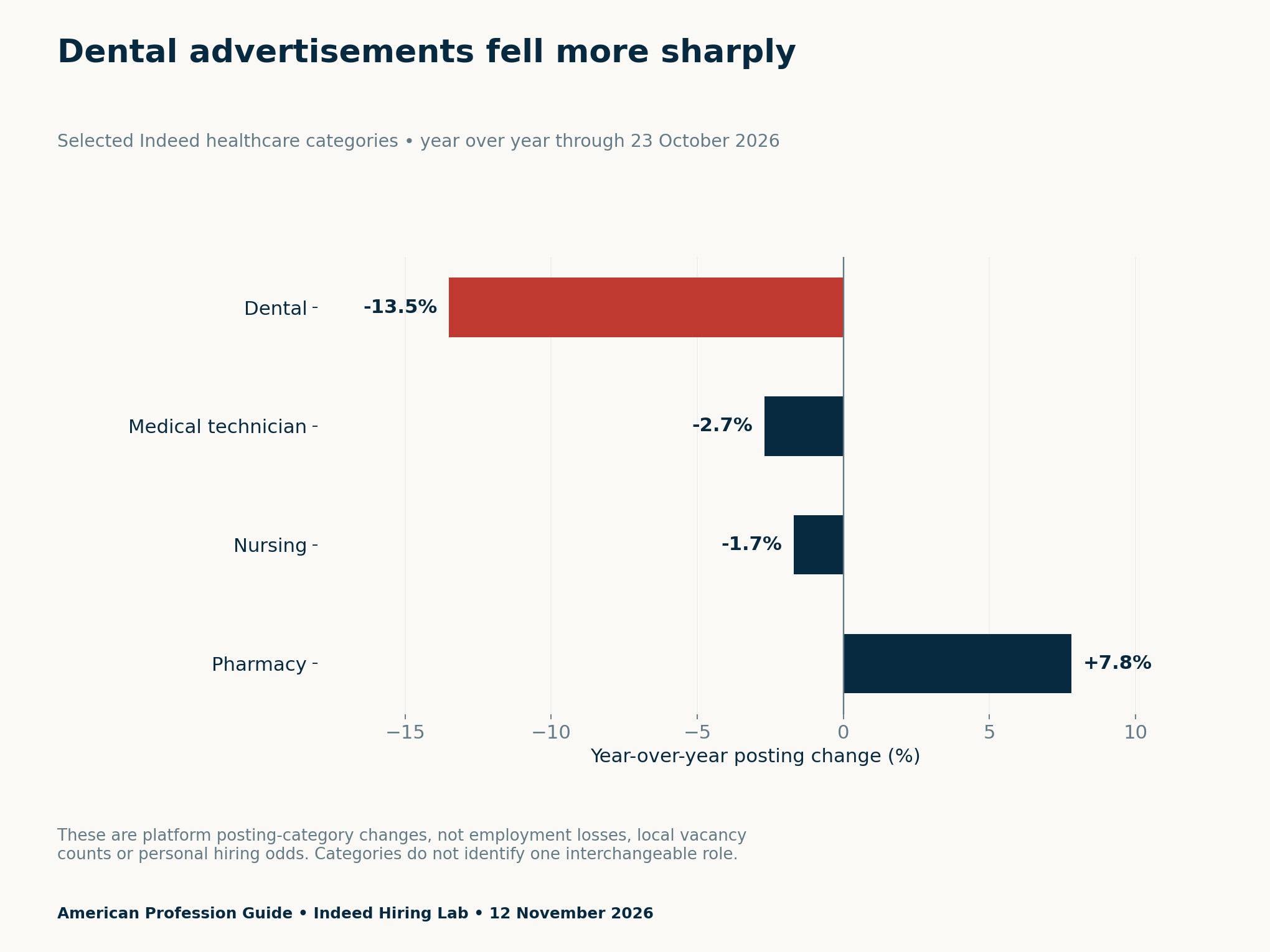
The dental category is not a single occupation or qualification. A broad posting trend cannot identify the number of eligible roles for your credentials, the hours available nearby or the competition for a particular requisition. Those questions need a narrower and separately documented collection exercise.
A yearly decline and a higher older baseline can coexist
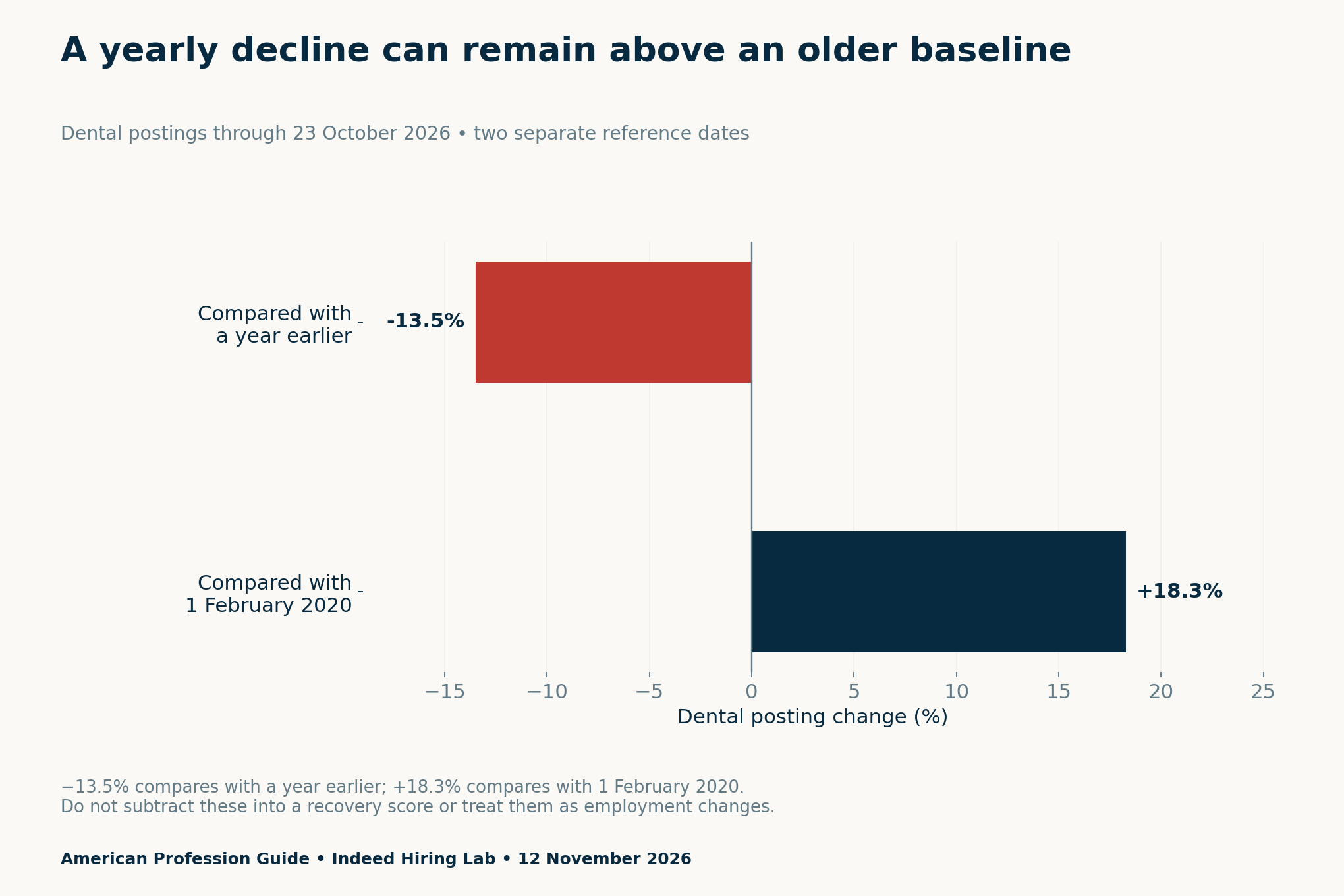
The source table places dental postings 18.3% above 1 February 2020. That is compatible with a recent decline because the comparison starts at a different point. Do not subtract the two rates into a career score or reinterpret either as a change in the number of employed dental workers.
Similarly, a category that grew faster is not automatically an accessible alternative. A different role may require different education, credentials or work experience. This article does not recommend moving between regulated occupations on the basis of a posting chart, and it does not assert any state-specific licensing rule.
Define the dental role before counting openings
Write your target role family at the top of the vacancy ledger. Then record each employer’s exact title and stated duties. Keep front-desk work, assisting, hygiene and dentist roles separate unless your research question explicitly calls for a comparison. A shared workplace does not make the jobs equivalent.
Record required credentials as the advertisement states them, along with a source and date. If the wording is ambiguous, leave a verification question. For any specific legal qualification or permitted scope, consult the relevant official authority for that location. An employer’s advertisement alone should not be treated as a complete statement of the rules.
A title can also hide a mixed duty set. Ask which responsibilities are central, what supervision applies and what the employer expects at the advertised level. Use those answers to refine your search group. Do not broaden a clinical role merely because an advertisement uses an informal label.
Set a location and time boundary before collecting
Choose a commuting area or another explicit location rule. If travel time matters, state how you will check it and under what conditions. A radius alone may not reflect the journey you can make. Keep your own boundary visible so an excluded listing does not become an unexplained omission.
Next, set a capture date and a posting window. Record the date stated by the employer where available. If a listing has no reliable posting date, label it as missing rather than assign one from a copied advertisement. Use the same rule throughout the collection.
Work hours deserve their own field. A live part-time position and a full-time role may both be relevant, but they answer different scheduling questions. Keep employment type and stated hours separate from pay. Do not assume an hourly rate confirms a minimum number of paid hours.
Use the decision tree to classify each vacancy
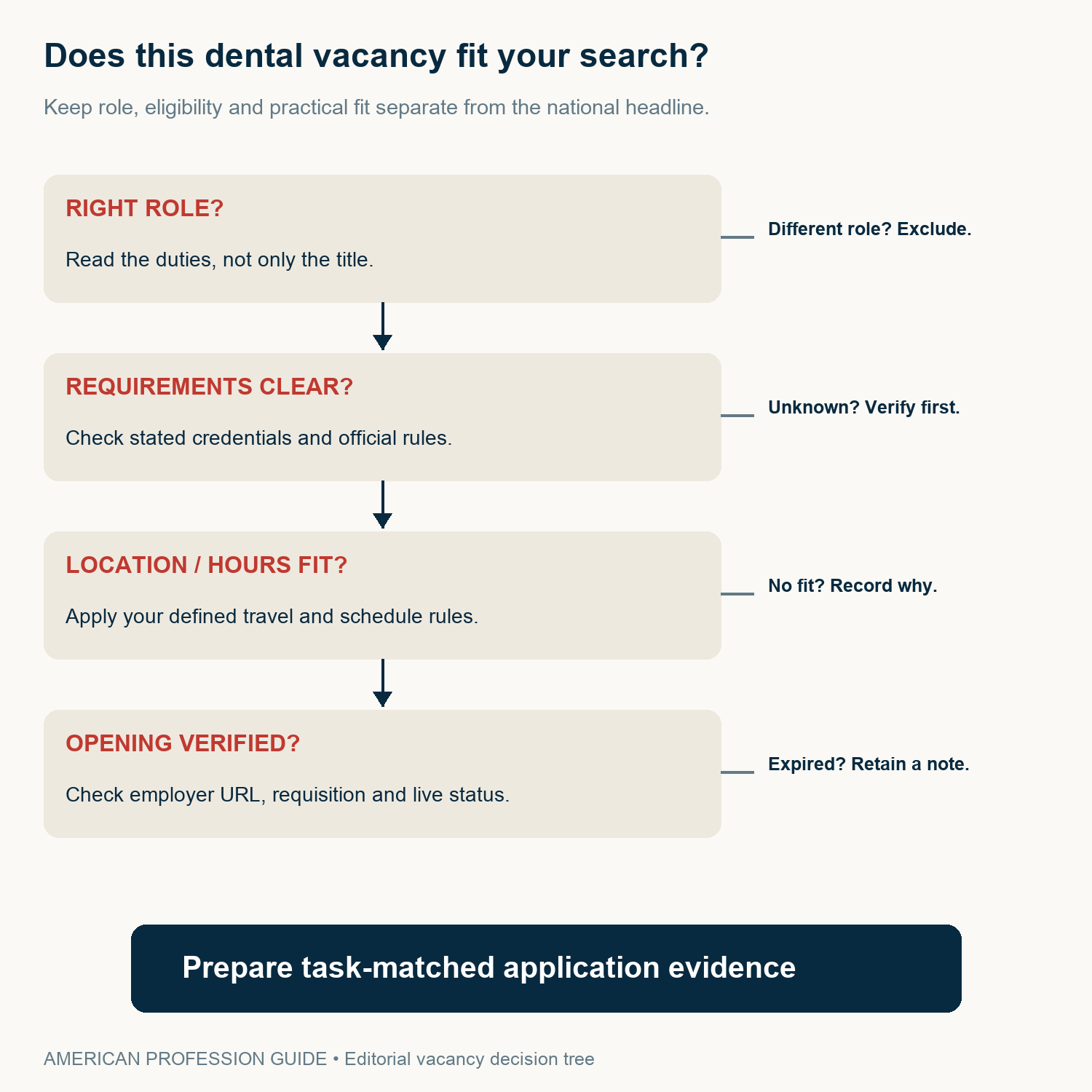
First, read the actual duties and decide whether the record belongs in your chosen role group. Next, check whether the stated requirements are clear enough to assess. An unresolved credential question is different from a confirmed mismatch. Keep those outcomes separate in the ledger.
Then apply your location and hours rules. Finally, check the employer’s own vacancy page and requisition. A role can fit your search but have expired. Conversely, a live advertisement can be unsuitable for your target group. Neither result proves that an entire local profession has no opportunities.
Deduplicate listings without hiding your decisions
The same requisition can appear on an employer site and several job boards. Retain the original discovery links, but count a confirmed repeated requisition once. Use the employer, identifier, location and duties to check the match. Similar titles alone are not enough to prove duplication.
Keep expired and excluded records in a separate status field. Record why they were excluded and when you checked. This preserves the path from collected advertisements to the final shortlist. It also lets you update the search without starting again or accidentally counting a repost as a new role.
When summarizing, report the number of collected records, confirmed unique requisitions and included roles. Explain the exclusions. A small convenience sample can help organize a search, but it is not a representative estimate of every practice or every vacancy in the area.
Ask better employer questions before committing time or money
Clarify the scope of work, onboarding, supervision and required qualifications. Ask about stated hours, employment arrangement and the basis of compensation. Keep unanswered questions visible. An attractive title or headline rate does not settle the full terms of the role.
Before paying for a course or expanding your travel area, identify the specific gap you are trying to address. Is it a stated credential requirement, a duty you need to understand or a schedule mismatch? A broad national percentage cannot establish that a particular purchase or change will improve your outcome.
Prepare application evidence around the verified duties. Use non-confidential examples of relevant administrative or professional work where appropriate, without including patient records or private employer material. Our matched-role comparison guide explains a related approach to keeping vacancy and pay evidence separate.
Download the source data and role-audit tools
- Selected healthcare posting values and dates (CSV)
- Blank role-first dental vacancy audit (CSV)
- Bounded collection and exclusion protocol (CSV)
- Blank employer-question ledger (CSV)
The blank tools contain no findings about local employers or readers’ eligibility. Use them to document a future search and keep private application details outside any public copy. Find more dated analyses in Research & Reports.
Methodology and limitations
We checked the selected category values against the original table in the dated Indeed Hiring Lab update on 16 November 2026. Both charts retain the 23 October observation date, while the second separates the yearly and February 2020 reference points. We did not access the underlying advertisements or estimate unique vacancies, hires, applicant competition or employment losses.
The role audit remains a collection protocol. No local employer sample, state-specific credential assessment or forecast is presented. We use two substantive charts because the source offers a small set of relevant summary values; adding repeated graphics would not create new evidence. The decision tree and ledgers are original editorial planning tools, not clinical or licensing guidance.


